



Technologic innovations and advances have changed our day-to-day lives, literally making information available at our fingertips. People are quick to buy the latest smartphones, smart TVs, connected home devices, cars, and other cutting-edge technologies in order to take advantage of everything these devices have to offer. However, I would argue that most people do not use them to their full potential. I have noticed a similar trend in medicine. Consider optical coherence tomography (OCT), for example.
AT A GLANCE
• Customized scanning allows evaluation of a large area of thickness map with increased ETDRS grid size.
• Multiline rasters with complete raster averaging areunlimited across scan sets.
• OCT scans can be captured with a 55˚ lens (16.9 mm) for ultra-widefield peripheral imaging.
When the first OCT device was released, it revolutionized the field of ophthalmology and especially retina. The line scans allowed us to see retinal details we were never before able to see, and segmentation algorithms provided thickness maps so that we could quantitatively monitor retinal pathologies. Today, despite the significant advances introduced with spectral-domain OCT (SD-OCT), many physicians likely only use the basic features, albeit with better resolution.
SD-OCT units are available from multiple manufacturers, including the EnFocus (Bioptigen), Cirrus HD-OCT (Carl Zeiss Meditec), Spectralis SD-OCT (Heidelberg Engineering), 3D OCT-2000 (Topcon), and iVue Spectral-Domain OCT (Optovue). I am personally most familiar with the Spectralis, using it on a daily basis over the past 7 years. This article highlights key features of that device to help users tap into its full potential. These features have helped my clinic improve efficiency, providing the best in patient care while also maximizing workflow.
SCANNING
The Spectralis can now run at 40 000 Hz or 85 000 Hz. An upgrade to the 85 000-Hz engine improves patient throughput with resultant increased capacity and workflow. When reviewing a cube using the Spectralis, simultaneous dual-beam imaging and TruTrack active eye tracking allow one to average each B-scan for optimal image quality across the entire raster. Noise reduction helps to improve image quality by filtering out random image points.
Raster Averaging
Multiline rasters with complete raster averaging are unlimited across scan sets. Complete raster averaging preserves the same line quality from one to the next, resulting in excellent quantitative analysis in the form of thickness maps. Complete raster averaging is customizable. The B-scan density can be changed from 11 µm to 300 µm spacing across any raster, with up to 100 averages per B-scan. Further customization includes high-speed (512 A-scans per B-scan) or high-resolution (1024 A-scans per B-scan) modes.
From a clinical perspective, in addition to allowing finer quality images, complete raster averaging is an important tool for printing reports with multiple areas of pathology for review through electronic health records (EHRs) or inclusion in research protocols. Multiple images that capture the area of interest can easily be selected and uploaded into the EHR for immediate or later review.
Scan Orientation
Rahimy et al showed that radial and raster scans were similarly useful in detecting pathology in diabetic macular edema (DME) and retinal vein occlusion, but there was a significant difference in detection of intraretinal fluid and subretinal fluid in age-related macular degeneration (AMD) that favored 25-line raster scans.1 The Spectralis can quickly and easily provide both types of scans or customize a scan for any choice of scan size and spacing down to 11 µm based on the referring diagnosis. Either horizontal or vertical capture is available in 3-, 6-, and 9-mm lines with a range of 30˚.
Ultra-Widefield Imaging
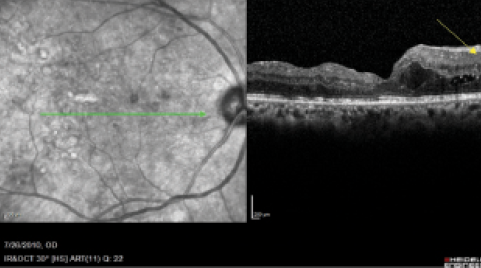
Figure 1. Scan length of raster (6 mm) allows only partial visualization of pathology.
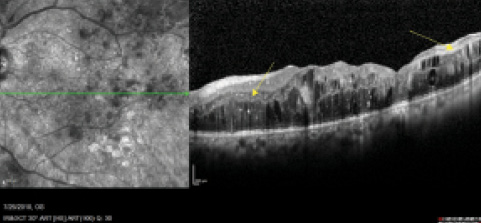
Figure 2. Technician observes pathology running past the captured area and expands to 9-mm scan line, thereby capturing the entire width of the cSLO image.
I find this setting particularly useful when I am treating DME and considering focal laser treatment. A side-by-side comparison of widefield OCT and fluorescein angiography (FA) imaging provides a full picture of the pathology, allowing me to plan treatment accordingly. Customized scanning enables the evaluation of a large area of thickness map with increased ETDRS grid size (1-, 2-, and 3-mm; 1.00-, 2.22-, and 3.45-mm; and 1-mm, 3-mm, and 6-mm ETDRS choices). Technicians can preset customized raster scan size settings, up to 30˚ x 25˚ (9 x 7.5 mm), for quick changes when increased areas of pathology are seen in the macula. With the device’s swivel scan head and optional fixation choices, technicians can easily and efficiently capture the big picture.
Occasionally there is pathology that extends beyond the central macula (Figure 1). When the macular pathology runs off the screen, I have taught my technicians to change the width of the raster scan in real time to image the entire area (Figure 2). Lesions or pathology in the midperiphery, temporal macula, or nasal areas can also be imaged easily, thanks to longer-width raster scans, real-time fundus imaging, and optional fixation choices.
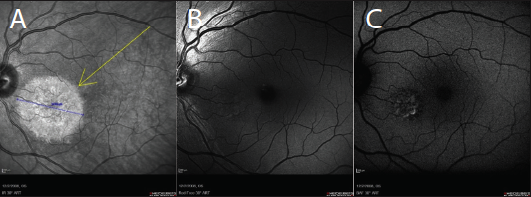
Figure 3. cSLO imaging modalities: infrared (A), red-free (B), and BluePeak autofluorescence (C).
The device’s confocal scanning laser ophthalmoscope (cSLO) technology allows operators to steer the OCT to image pathology in the far retinal periphery. It can also be used to noninvasively scan patients through pupils as small as 1 mm and with no light-off restrictions. Furthermore, multicolor, red-free, FA, and FA plus indocyanine green (ICG) imaging (Figure 3) can be initiated with pupils at 2 mm, thus reducing wait times for patients to dilate.
Multimodality Imaging
The Spectralis can mix and match modes for combining SD-OCT, fundus imaging, autofluorescence, ICG, and FA into one session without moving the patient from instrument to instrument, thus improving efficiency and workflow. These imaging modalities can be added to the SD-OCT or Heidelberg Retina Angiograph camera for real-time correlations and comparisons. All images are networked together under one database and carried across both systems. Integration of the database across multiple Spectralis systems is highly advantageous for use with remote servers and for archiving solutions.
Lens Options
The Spectralis can be equipped with 30˚ and 55˚ lenses for ultra-widefield peripheral imaging and OCT functions. Ultra-widefield FA plus ICG imaging can be captured by a photographer with a separate ultra-widefield lens. Ultra-widefield FA is beneficial for imaging the far periphery, especially in patients with diabetes, uveitis, and other peripheral pathologies.
Autofluorescence
BluePeak blue laser autofluorescence imaging can be beneficial for tracking metabolic buildup (lipofuscin) in the eyes of patients with dry AMD and those taking hydroxychloroquine. The system comes with region-finder software that allows quantitative analysis of geographic atrophy.
NETWORKING, PRINTING, AND ARCHIVING
Using Heidelberg software, the Spectralis can be networked into exam lanes to determine exact correlation for progression analysis using the AutoRescan functionality of the dual-beam eye-tracking laser. Earlier images are referenced so that follow-up scans can be imaged with point-to-point correlation to within 1 µm.
As a result of this feature, I can concurrently scroll through the previously obtained line scans and current scans so I can quickly and efficiently assess disease progression or regression. I also find this feature invaluable in educating patients and efficiently explaining their retinal disease and response to treatment.
For a more quantitative analysis, the AutoRescan function provides a detailed thickness map progression analysis on a single page. This allows me to get an overall understanding of the treatment effect or progression of retinal pathology with a second’s glance.
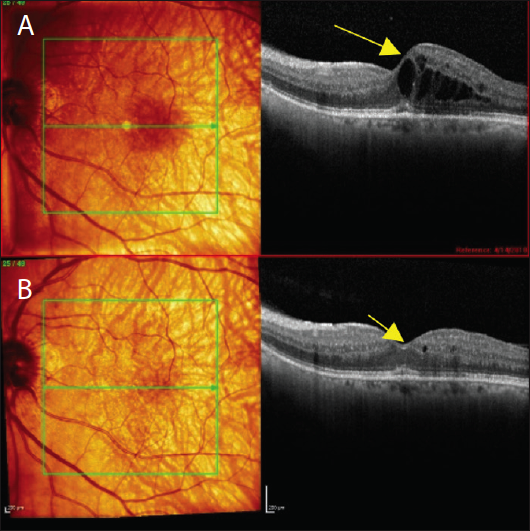
Figure 4. Previously obtained SD-OCT (A) shows macular edema. Corresponding SD-OCT from current visit after treatment with an anti-VEGF agent (B).
With regard to information and data needs, I prefer the central line scan through the fovea and the corresponding thickness map for new patients. For follow-ups, I use the AutoRescan function to get detailed comparison maps that offer a quick, detailed comparison to images from the previous visit (Figure 4). I also find this function useful for illustrating improvement or worsening (green = good, red = bad) to patients. These reports allow operators to quickly build quality reports customized to an individual doctor and to either print or upload them to the EHR. I glance at this one-page report prior to entering the exam room to get an initial idea of the pathology. I review the actual line scans once I am in the room; this all takes place in a matter of seconds (Figure 5).
Each Spectralis is set up with an auto-archive function that must be run each night. When this feature is engaged, the system will automatically back up each day’s activities.
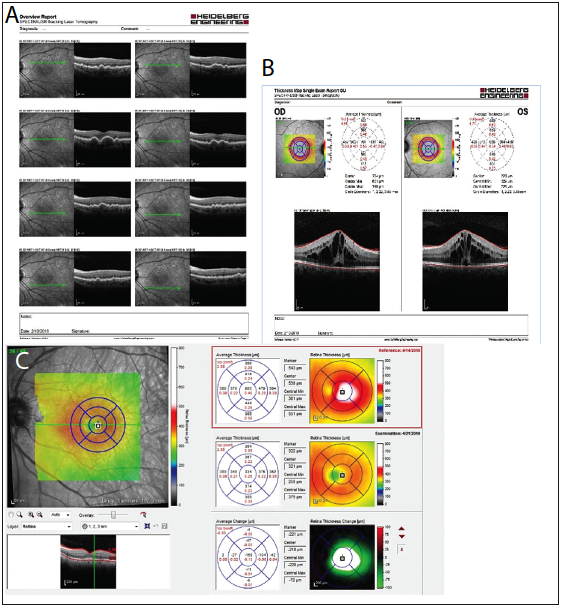
Figure 5. Customizable ways to evaluate and interpret image data. Multiple line images on one page (A). Central line scan of both eyes with corresponding thickness map and quantitative thickness (B). Central line scan, thickness map overlayed on fundus image, and quantitative thickness map comparisons from prior visit (C).
CONCLUSION
If you use the Spectralis, you may be happy with its current performance, but there is a good chance you could be happier using some of the advanced features discussed in this article. I hope the article helped to shed some light on hidden tricks that can make a difference, improving your practice’s efficiency, quality of care, and patient satisfaction. n
1. Rahimy E, Rayess N, Maguire JI, Hsu J. Radial versus raster spectral-domain optical coherence tomography scan patterns for detection of macular pathology. Am J Ophthalmol. 2014;158(2):345-353.
S.K. Steven Houston III, MD
• retina surgeon at Florida Retina Institute
• financial interest: none acknowledged
• shouston3@gmail.com


